
Introduction
A well-executed film schedule is the backbone of successful production. From coordinating cast and crew availability to managing location logistics and equipment rentals, your film shooting schedule determines whether you stay on time and on budget—or whether your production spirals into chaos and financial disaster.
Whether you’re creating your first movie scheduling program or managing complex multi-unit productions, understanding the fundamentals of scheduling and having access to the right scheduling software for film can transform how your production operates.
This comprehensive guide covers everything you need to master film scheduling, including step-by-step processes for creating effective film shooting schedule templates, comparisons of popular tools like Movie Magic Scheduling, and strategies for overcoming common scheduling challenges that plague filmmakers across all budget levels.
What Is a Film Shooting Schedule and Why Does It Matter?
Understanding the Fundamentals
A film shooting schedule is a detailed production document that outlines exactly which scenes and shots will be filmed on each production day. It’s the master plan that orchestrates the movement of cast, crew, equipment, and locations throughout principal photography.
Unlike simply arranging scenes in script order, effective scheduling requires strategic thinking about locations, actor availability, weather conditions, equipment needs, and creative priorities. The shooting schedule is created during pre-production but used daily during production to create call sheets, manage crew coordination, and track progress.
The Strategic Difference Between Script Order and Shooting Order
One of the biggest misconceptions among new producers is that you must shoot scenes in the order they appear in the script. In reality, professional filmmakers almost always shoot out of sequence, organized by location efficiency and cast availability.
Example: Your script has scenes at an apartment appearing on pages 5, 15, and 42. Rather than moving your entire crew to the apartment three separate times, you’d shoot all apartment scenes on the same day or over consecutive days. This “company move” strategy significantly reduces production time and location costs.
This is why your movie scheduling program must allow flexibility in reorganizing scenes while tracking all the elements involved—actors, props, costumes, special effects, and location requirements.
Film Scheduling Fundamentals: The Foundation
Step 1: Script Breakdown
Every effective schedule begins with a comprehensive script breakdown. This process involves analyzing each scene and tagging all the elements needed for production:
- Cast members (principal actors and supporting roles)
- Extras and background artists
- Locations (interior/exterior, day/night)
- Props and set dressing
- Costumes and wardrobe changes
- Special effects and stunts
- Vehicles and animals
- Stunts and action sequences
Modern film budget software and scheduling software for film automate much of this work, automatically detecting and categorizing scene elements when you import your script. This eliminates manual data entry errors and saves countless hours compared to traditional breakdown sheets.
Step 2: Location-Based Grouping
After breakdown, strategically group scenes by shooting location. This is where your movie scheduling program truly demonstrates its value.
Location grouping benefits:
- Reduces company moves (expensive crew relocations)
- Minimizes location rental days
- Simplifies equipment setup and breakdown
- Allows cast and crew to establish rhythm at each location
- Reduces travel time and crew fatigue
For example, if your budget only allows two location shooting days but you have six location types in your script, strategic grouping means combining locations that can serve similar purposes or finding multi-purpose locations.
Step 3: Cast and Crew Availability Management
Not every actor is available for the entire shoot. Lead actors may be contracted for specific days. Key crew members like your Director of Photography, Production Designer, or visual effects supervisor might have competing commitments. Your schedule must balance these availability windows while maintaining productive shooting days.
Day Out of Days (DOOD) Reports become critical here. This industry-standard document shows exactly which days each actor is working, holding (on-call but not working), or traveling. Your movie magic scheduling software should generate these automatically, preventing costly scheduling conflicts.
Step 4: Building Your Stripboard
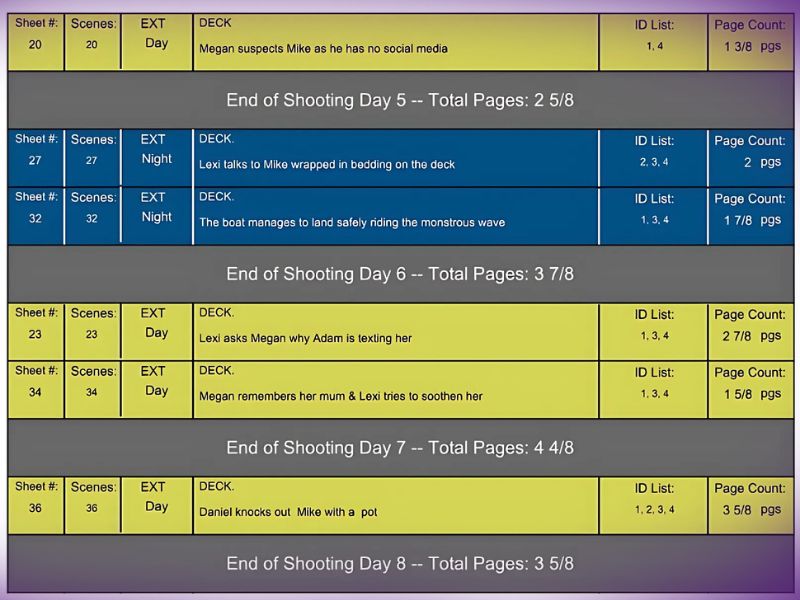
The stripboard is the visual heart of film scheduling. Historically created with colored strips of paper on a board (where each scene gets a different color), modern scheduling software for film represents this digitally.
Each “strip” contains:
- Scene number
- Interior/Exterior designation
- Day/Night status
- Location
- Cast involved
- Page count
- Special requirements
The beauty of a digital stripboard is that you can reorder scenes instantly, see conflicts highlighted automatically, and generate reports with a single click.
Creating Your Film Shooting Schedule: Step-by-Step Process
Phase 1: Pre-Production Planning
Define Your Production Parameters:
- Number of shooting days (typically 5 pages per day for dramatic content)
- Pre-production timeline (3-6 weeks for most productions)
- Post-production requirements (affects crew scheduling)
- Location availability windows
- Union requirements (SAG-AFTRA, IATSE, or non-union)
Conduct Thorough Location Scouting:
Location scouting directly impacts your schedule’s feasibility. Scout locations considering:
- Permit requirements and approval timelines
- Accessibility for crew and equipment
- Parking and base camp space
- Weather exposure
- Noise restrictions
- Neighbor relations and availability windows
- Connectivity for crew communication
A location that seemed perfect in photos might have five-hour permitting requirements or impossible lighting angles. These discoveries during scouting should inform your schedule before you’re locked in.
Lock Key Talent Commitments:
Before finalizing your schedule, confirm availability with your director, lead actors, and key crew. Nothing derails schedules faster than discovering your lead actor is unavailable for the week you planned to shoot their most important scenes.
Phase 2: Building Your Schedule
Create Your Stripboard:
Using your film shooting schedule template or movie scheduling program, begin placing scenes based on location grouping. Most professionals use one of three organization methods:
Location-First Approach: Group all scenes at each location together (most common for location-heavy productions)
Cast Availability Approach: Schedule around actor contracts and availability windows
Creative Flow Approach: Balance efficiency with narrative considerations (shooting related scenes together even if locations differ)
Calculate Page Counts and Timing:
Professional industry standards suggest filmmakers can shoot approximately 5 pages per day for dramatic narrative content. However, this varies significantly:
- Action-heavy scenes: 2-3 pages per day
- Dialogue-driven scenes: 8-10 pages per day
- Establishing shots: 10-15 pages per day
- Scenes with stunts/effects: 1-2 pages per day
- Intimate character moments: 6-8 pages per day
Experienced line producers validate these estimates, as underestimating shoot days is one of the most common—and costly—mistakes in scheduling.
Account for Department-Specific Prep:
Different departments require different amounts of setup time:
- Camera Department: Full prep and wrap days (typically 1 day prep, 1 day wrap)
- Art Department: Extended prep for set construction and dressing
- Lighting: Significant setup time, especially for complex scenes
- Sound: Usually minimal setup beyond initial location survey
- Hair/Makeup: Consider chair time for principal cast
Your movie magic scheduling download or scheduling software should allow you to assign department-specific prep and wrap days, automatically calculating these into crew scheduling.
Phase 3: Building in Buffers and Contingency
Account for Weather:
Outdoor shoots require weather contingencies. Industry practice is to identify backup dates or alternative indoor scenes that can be filmed if weather prevents scheduled outdoor shoots.
Schedule Pickup Days:
Always budget 2-3 additional “pickup” or “contingency” days for:
- Scenes that didn’t work creatively
- Technical issues during principal photography
- Director’s last-minute creative changes
- Coverage you want but didn’t get in original schedule
Plan Turnaround Time:
Crew turnaround requirements (time between wrap and next call) vary by production and union status:
- Non-union: Typically 8 hours minimum
- Union: Often 12-14 hours required between wrap and call
- Heavy days: May require longer turnaround (no night shoots followed immediately by early morning shoots)
Phase 4: Creating Call Sheets from Your Schedule
Your daily shooting schedule becomes the source document for call sheets. Call sheets take information from your schedule and translate it into department-specific timing and requirements:
Call Sheet Essential Information:
- Call times for each department
- Scene numbers and descriptions
- Cast involved and arrival times
- Estimated crew release time
- Special department requirements
- Meal break windows
- Emergency contact information
- Weather forecast and contingency plans
Modern scheduling software for film often integrates call sheet generation directly from your schedule, reducing manual work and preventing version control issues.
Film Scheduling Software and Tools: Comprehensive Comparison
Movie Magic Scheduling: The Industry Standard
Movie Magic Scheduling (MMS) remains the most widely used professional scheduling software in the film industry, with over 40 years of proven track record.
Strengths:
- Intuitive stripboard interface based on decades of industry feedback
- Advanced script breakdown capabilities
- Multi-unit scheduling for complex productions
- Real-time conflict detection preventing scheduling overlaps
- Comprehensive calendar management for events beyond shooting days
- Powerful reporting features (DOOD reports, production calendars, crew lists)
- Industry-standard format accepted by studios and completion bonds
- Integration capabilities with other production software
Limitations:
- Desktop-only (no cloud collaboration until recent versions)
- $489 one-time fee or $50/month subscription (higher than some alternatives)
- Steep learning curve requires training or experience
- Not updated as frequently as newer cloud-based competitors
- Limited mobile access
Ideal For: Studio productions, complex multi-unit shoots, productions requiring traditional industry formats, productions funded by entities requiring MMS compatibility
Pricing: $489 (perpetual license) or $50/month (subscription)
Download: Available on Entertainment Partners’ website for Mac and Windows
Gorilla Scheduling: Affordable Professional Alternative
Gorilla Scheduling by Jungle Software offers powerful scheduling capabilities at a fraction of Movie Magic’s cost.
Strengths:
- Significantly more affordable ($249 perpetual or $20/month)
- Integrated budgeting and scheduling
- Robust reporting features
- Good for feature films and TV series with complex schedules
- Built-in shot library for storyboard creation
- 20+ years of development and refinement
Limitations:
- Smaller industry adoption than Movie Magic
- Desktop-only (no real-time collaboration)
- Some users report occasional glitches
- Less comprehensive than Movie Magic for very large productions
- Steeper learning curve for new users
Ideal For: Independent filmmakers, low-to-mid-budget productions, small production companies, students and film schools
Pricing: $69 one-time or $20/month subscription
StudioBinder: Modern Cloud Collaboration
StudioBinder represents the new generation of film scheduling software—cloud-based, collaborative, and integrated with modern production workflows.
Strengths:
- Cloud-based with real-time collaboration across team members
- Modern, intuitive interface requiring minimal training
- Seamless script import (Final Draft, PDF, Fountain formats)
- Integrated production management (call sheets, shot lists, storyboarding)
- Mobile-friendly for on-set access
- Automatic DOOD and Day Break reporting
- Real-time team communication and task management
- Responsive customer support
Limitations:
- Subscription-only (no perpetual license option)
- Requires internet connection for full functionality
- Not as widely accepted for large studio productions as Movie Magic
- May be overkill for very simple one-person productions
Ideal For: Modern production teams, collaborative shoots, filmmakers who use other StudioBinder tools, productions valuing ease of use over industry traditionalism
Pricing: Starting at $29/month for individual creators, team plans available
Celtx: Integrated Pre-Production Suite
Celtx evolved from a simple screenwriting tool to a comprehensive pre-production platform combining writing, scheduling, budgeting, and collaboration.
Strengths:
- Affordable cloud-based platform ($20/month start)
- Integrated scriptwriting and scheduling
- Good for smaller projects and independent filmmakers
- Drag-and-drop scheduling interface
- Collaborative features for remote teams
- Automatically generated stripboards
Limitations:
- Scheduling features less comprehensive than dedicated tools
- Not ideal for very complex productions
- Smaller adoption in professional industry
- Less robust reporting than Movie Magic or Gorilla
Ideal For: Indie filmmakers, students, writers developing projects, small production teams, low-budget films
Pricing: Writer Plan – $14.99/month, Writer Pro – $24.99/month, Team – $59.95/month
First Draft Filmworks: AI-Powered Scheduling
First Draft Filmworks (https://firstdraftfilmworks.com/) represents the cutting edge of scheduling workflow, incorporating artificial intelligence to automate much of the scheduling workflow.
Strengths:
- All pre-production services under one roof
- Fully collaborative and adaptable
- Editable, industry-format files delivered ready for production
- 2–5 days for the complete process
- Simple, transparent pay-per-service
- Revisions included within scope
Ideal For: Tech-forward filmmakers, indie productions, filmmakers who value automation and ease of use
Pricing: Depends on your project.
Choosing Your Scheduling Tool: Decision Matrix
| Consideration | Movie Magic | Gorilla | StudioBinder | Celtx | First Draft Filmworks |
|---|---|---|---|---|---|
| Budget ($25k-$100k) | ⭐⭐⭐ | ⭐⭐⭐⭐⭐ | ⭐⭐⭐⭐ | ⭐⭐⭐⭐⭐ | ⭐⭐⭐⭐ |
| Budget ($100k+) | ⭐⭐⭐⭐⭐ | ⭐⭐⭐⭐ | ⭐⭐⭐⭐ | ⭐⭐⭐ | ⭐⭐⭐⭐⭐ |
| Collaboration Features | ⭐⭐ | ⭐⭐ | ⭐⭐⭐⭐⭐ | ⭐⭐⭐⭐ | ⭐⭐⭐⭐⭐ |
| Ease of Learning | ⭐⭐ | ⭐⭐⭐ | ⭐⭐⭐⭐⭐ | ⭐⭐⭐⭐ | ⭐⭐⭐⭐⭐ |
| Professional Acceptance | ⭐⭐⭐⭐⭐ | ⭐⭐⭐ | ⭐⭐⭐⭐ | ⭐⭐⭐ | ⭐⭐⭐⭐⭐ |
| Reporting Capabilities | ⭐⭐⭐⭐⭐ | ⭐⭐⭐⭐ | ⭐⭐⭐⭐ | ⭐⭐⭐ | ⭐⭐⭐⭐⭐ |
| Integration with Other Tools | ⭐⭐⭐⭐ | ⭐⭐⭐ | ⭐⭐⭐⭐⭐ | ⭐⭐⭐⭐ | ⭐⭐⭐⭐ |
| Mobile Accessibility | ⭐⭐ | ⭐⭐ | ⭐⭐⭐⭐⭐ | ⭐⭐⭐⭐ | ⭐⭐⭐⭐⭐ |
Film Shooting Schedule Template: Building Your Own
If you prefer working with a film shooting schedule template, the essential columns to include are:
Core Information Columns:
- Start Time: When the crew calls for this activity
- Scene Number: Reference to your shooting script
- INT/EXT: Interior or Exterior location
- Scene Setting: Brief description of scene action
- D/N: Day or Night designation
- Cast: All actors in the scene
- Shooting Location: Address or location name
- Page Count: Script pages being shot
- Estimated Time: Hours required to complete scene
- Notes: Special requirements or department information
Additional Columns for Complex Productions:
- Stunts/Special Effects required
- Extra count
- Animals involved
- Camera packages needed
- Props and wardrobe changes
- Permit requirements
- Crew overtime expectations
- Department-specific call times
Your film shooting schedule template should include an advance schedule section showing the next day’s plan, allowing crews to prepare for special requirements before they’re called.
Creating Your Template
Most productions use spreadsheet formats (Excel, Google Sheets) because they’re flexible and familiar. Your template should:
- Auto-calculate totals: Page count and estimated time per day
- Highlight conflicts: Flag impossible scheduling (actor in two places simultaneously)
- Allow sorting: Reorganize by location, cast, or other parameters
- Support notes: Include department-specific information
- Generate reports: Export to PDF or other formats for distribution
Advanced Film Scheduling Strategies
Multi-Unit Scheduling
Large productions often run multiple units simultaneously:
- Unit A: Principal photography with lead actors
- Unit B: Second unit capturing establishing shots, stunts, or vehicle action
- Unit C: Pickup unit for coverage and close-ups
Your scheduling software must track conflicts across all units—if your lead actor is with Unit A, they can’t be with Unit B. This is why features like Movie Magic Scheduling’s multi-unit capabilities or StudioBinder’s conflict detection are so valuable.
Weather Contingency Planning
For productions with significant exterior shooting:
- Identify flexible scenes: Indoor alternatives that can be filmed if weather prevents outdoor shoots
- Build swing days: Extra days in your schedule specifically for weather rescheduling
- Regional research: Understand historical weather patterns for your shooting location and season
- Equipment protection: Schedule covered setup areas for gear on changeable weather days
Union Considerations
Union productions have specific scheduling requirements:
- SAG-AFTRA: Turnaround requirements, meal penalties, consecutive day limitations
- IATSE: Crew turnaround times, penalty rates for short turnarounds, minimum paid hours
- Teamsters: Vehicle coordination and driver requirements
Professional scheduling software accounts for these automatically if properly configured.
The “Lord of the Rings” Approach to Pre-Production Scheduling
Peter Jackson’s legendary pre-production scheduling for “The Lord of the Rings” trilogy demonstrates scheduling at its most ambitious. Four years of pre-production planning allowed:
- Meticulous location preparation and setup
- Actor training and costume fitting
- Set construction completed before principal photography
- Comprehensive storyboarding and planning
- Zero on-set surprises during shooting
While your production likely has shorter timelines, the principle remains: thorough pre-production scheduling prevents costly production day problems.
Common Film Scheduling Mistakes and How to Avoid Them
Mistake 1: Underestimating Scene Complexity
New producers often use the “five pages per day” rule for all scenes. In reality, a complex action sequence with stunts might require 10 hours to shoot two pages, while a dialogue scene in a simple apartment might shoot 15 pages in the same time.
Solution: Have your director and cinematographer review your schedule estimates before locking it. Get input from department heads on their specific setup requirements.
Mistake 2: Insufficient Buffer Time
Scheduling every moment of your production day to the minute leaves zero room for the inevitable: equipment malfunction, lighting challenges, performance adjustments, or simply underestimated setup time.
Solution: Build in 15-30% additional time beyond your calculated needs. If you estimate 8 hours of shooting, allocate 10-hour shoot days to reality.
Mistake 3: Ignoring Logistics
Forgetting travel time between locations, meal breaks, equipment setup, or breakdown can destroy your daily schedule.
Solution: Walk through your location with department heads and realistic travel times. Include setup, meal breaks, and wrap time in your daily calculations.
Mistake 4: Locking the Schedule Too Early
Changes are inevitable during pre-production. Director’s new creative ideas, actor availability changes, location fallbacks—these require schedule flexibility.
Solution: Keep your schedule in “draft” status until 2-3 weeks before production starts. Allow for revisions as information becomes concrete.
Mistake 5: Not Communicating Schedule Changes
When you update your schedule, the entire crew needs to know immediately. Outdated call sheets cause chaos.
Solution: Use cloud-based scheduling software with version control and notification systems. Never email PDFs—use live documents that update automatically.
Advanced Scheduling Techniques for Efficiency
Location Clustering
Group shooting locations by geographic proximity rather than script order. If you’re shooting in one neighborhood, schedule all neighborhood scenes consecutively, even if they’re scattered throughout your script.
Reverse Shooting
Some productions shoot out of sequence not by location but by actor availability. Shoot all scenes for your guest star in consecutive days (even if those scenes occur at story’s beginning, middle, and end), then release them while continuing with other cast.
Day/Night Separation
Split your schedule to shoot all day scenes at a location, then convert for night shoots. This prevents the expensive and crew-exhausting practice of changing lighting setups for day/night sequences at the same location.
Dependency Mapping
Create a visual map of which departments depend on others finishing first:
- Sets must be built before lighting can rig
- Lighting must be complete before camera can rehearse
- All tech must be complete before actors block scenes
Your schedule reflects these dependencies, preventing the bottleneck of waiting for slow departments.
Best Practices for Distribution and Updates
The Daily Call Sheet Workflow
Your film shooting schedule generates your daily call sheets through this workflow:
- Extract tomorrow’s schedule information from your master schedule
- Customize timing for each department (camera calls at 6 AM, art department at 4 AM)
- Add special notes and requirements
- Distribute to all crew 24 hours before shoot day
- Update immediately if changes occur (distribution platforms ensure everyone gets updates)
Real-Time Communication
Modern scheduling software for film enables real-time updates:
- Schedule change occurs (weather, actor availability change)
- Producer updates the master schedule
- All crew members receive notification immediately
- Call sheets update automatically
- No one operates on outdated information
Advance Schedules
Always include your next 5-7 days’ schedule below the current day’s schedule. This allows departments to prepare special requirements in advance:
- Art department knows they’ll need to change set dressing
- Camera knows a complex action sequence is coming
- Stunts coordinator can pre-position equipment
- Catering knows tomorrow will require 150 meals (exterior multi-day location)
The Role of the First Assistant Director in Scheduling
Your 1st AD is the person primarily responsible for executing the schedule on set. This means your schedule must be:
- Realistic: The 1st AD can actually accomplish what’s planned
- Detailed: Special requirements are clearly noted
- Flexible: Room for adjustments without losing entire schedule
- Coordinated: Every department knows their timing and requirements
The best schedules are created collaboratively between producers, the line producer, 1st AD, and department heads—not imposed from above without input.
Scheduling Low-Budget and Indie Productions
Maximizing Limited Resources
Low-budget productions must be even more strategic with scheduling:
Prioritize ruthlessly: Which scenes are most important to your story? Shoot those on your best days with full crew.
Embrace your constraints: Limited locations can become a stylistic choice. One main location with strategic exteriors challenges you creatively.
Consolidate departments: On small crews, people wear multiple hats. Your cinematographer might also supervise lighting. Your production designer might manage props.
Shoot efficiently: Fewer company moves mean faster production. One location for multiple consecutive days beats moving constantly.
Free and Low-Cost Scheduling Solutions
Spreadsheet-Based Approaches:
- Google Sheets templates (free)
- Excel templates (minimal cost)
- Allows customization to your specific needs
- Requires manual conflict detection
For micro-budget productions, a well-organized spreadsheet with discipline and communication can work effectively, though software saves significant time and error-reduction.
Conclusion: Mastering the Art and Science of Film Scheduling
Effective film scheduling is both art and science. The science involves understanding production logistics, realistic time estimates, and strategic planning. The art involves creative problem-solving, flexibility, and communication—turning potential chaos into organized, achievable production days.
Whether you’re using the industry-standard Movie Magic Scheduling, exploring modern alternatives like Celtx, creating a custom film shooting schedule template, or working with spreadsheets, the fundamentals remain constant: thorough pre-production planning, realistic estimates, strategic organization, and clear communication prevent disasters.
Your shooting schedule is ultimately a promise you’re making to your crew, cast, and funders. It says: “Here’s exactly what we’re doing, when we’re doing it, and what’s required.” Breaking that promise leads to overages, crew frustration, and compromised creative vision.
If you’re developing your first production schedule, managing a complex feature film, or trying to optimize existing scheduling processes, professional guidance can prevent countless costly mistakes. Experienced line producers and production managers have managed hundreds of productions—they know what works, what doesn’t, and how to adapt schedules to unexpected realities.
At First Draft Filmworks (https://firstdraftfilmworks.com/), our production team brings over 8 years of experience creating shooting schedules across diverse production types—from intimate dramas to large ensemble pieces, from single-location indie films to multi-location feature productions. Our Film Scheduling service provides comprehensive schedule development from script breakdown through pre-production, helping filmmakers optimize every production day for efficiency, cost management, and creative execution.
Whether you need help with your first schedule, optimization of an existing plan, or complete schedule management through pre-production, our team delivers professional-grade scheduling that anticipates problems before they become crises.
Ready to master your production schedule? Visit https://firstdraftfilmworks.com/ to explore our Film Scheduling services and schedule a consultation with one of our experienced line producers today.
FAQ: Common Film Scheduling Questions
Q: How many pages per day can we realistically shoot?
A: Typically 5 pages per day for dramatic dialogue, but this varies: 2-3 pages for action/stunts, 8-10 for simple dialogue. Have your director and cinematographer validate estimates.
Q: Should I shoot in script order or reorganize?
A: Always reorganize for efficiency. Shoot by location, then actor availability, then scene complexity. Script order is the least efficient approach.
Q: What’s the difference between a stripboard and a shooting schedule?
A: A stripboard is the visual organization tool showing how scenes connect. The shooting schedule is the detailed daily plan extracted from the stripboard.
Q: How often should I update my schedule?
A: Keep it in draft through early pre-production. Lock it 2-3 weeks before production. Update immediately when significant changes occur (location changes, actor availability changes, weather).
Q: Can I use free scheduling software for professional productions?
A: For productions under $100k, free or low-cost software often works fine. For larger productions, professional software investment usually saves more than it costs.
Q: What should I do if I’m behind schedule during production?
A: Your 1st AD will identify this daily. Options: combine scenes, reduce coverage on non-essential scenes, adjust locations, or use contingency days. Never skip proper setup—quality suffers more than time saves.
Q: How do I schedule around talent availability?
A: Create Day Out of Days (DOOD) reports showing each actor’s availability. Schedule all their scenes in concentrated blocks during their contracted days, then release them.
Q: Should I build contingency days into my schedule?
A: Absolutely. Most professionals recommend 2-3 days beyond your calculated needs to account for weather, technical issues, and creative changes.

