
Introduction
Creating a film budget is one of the most critical yet challenging tasks in production management. Whether you’re working on a low-budget indie feature, a commercial project, or a full-scale production, understanding the fundamentals of film budget format and having the right tools at your disposal can mean the difference between a successful production and a financial disaster.
A film budget is more than just a spreadsheet—it’s a financial roadmap that details every projected cost involved in bringing your vision to life. It encompasses everything from cast and crew salaries to equipment rentals, locations, post-production, and marketing expenses. Without a solid production budget format, you risk overspending, running out of resources, or losing investor confidence before you even roll cameras.
In this comprehensive guide, we’ll walk you through how to create an effective film budget, explore various film budget template options (including Excel and PDF formats), discuss film budget software solutions, and provide actionable strategies for keeping your film low budget project on track.
What Is a Film Budget and Why Does It Matter?
Defining Your Film Budget
A film budget is a comprehensive financial planning document that outlines all anticipated costs for your production from development through distribution. It serves two critical purposes: internal cost management and external fundraising credibility.
When pitching to investors, lenders, or funding bodies, your budget demonstrates that you’ve thought through every aspect of production and can execute your vision responsibly. Internally, it keeps your team accountable and helps you make strategic creative decisions when resources are limited.
The Two-Phase Budgeting Approach
Most productions benefit from developing budgets in two phases:
Preliminary Budget (Pitch Budget): Created early in development to estimate overall project cost and secure financing. This version is more generalized and focuses on major cost categories rather than granular detail.
Detailed Budget (Production Budget): Developed after greenlight when you have concrete information about cast, crew, locations, and schedule. This comprehensive version tracks actual costs and includes detailed line items for every department.
Understanding Film Budget Format Categories
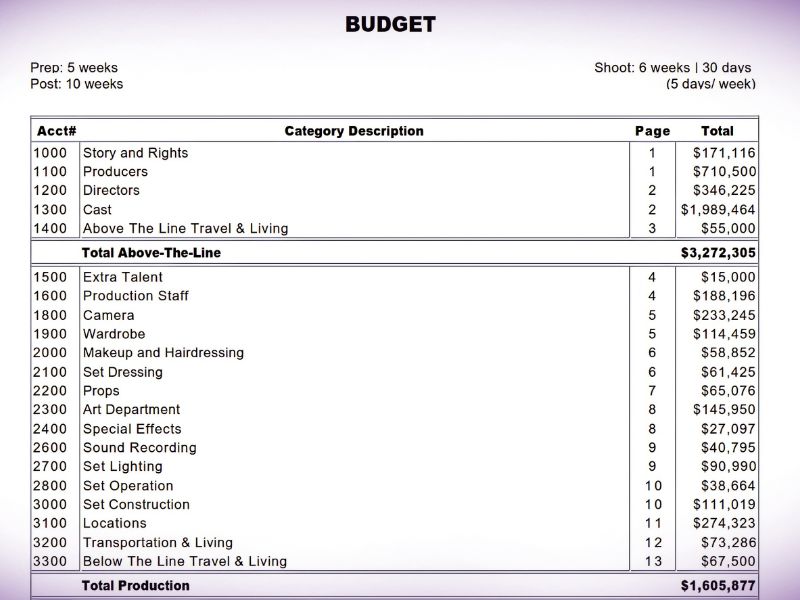
A proper production budget format breaks down into seven main cost categories. Understanding each is essential to building an accurate budget:
1. Above-the-Line (ATL) Costs
Above-the-line expenses include the creative talent that shapes your project before production begins. This category encompasses:
- Producer(s) and line producer fees
- Director compensation and prep fees
- Screenwriter(s) fees
- Principal cast salaries
- Casting director fees
- Development costs and legal fees related to acquisition of rights
These costs are called “above-the-line” because they traditionally appear above a line on production budgets and are typically negotiated as individual package deals rather than calculated on a per-day basis.
2. Below-the-Line (BTL) Production Costs
The production category represents the largest portion of most budgets and includes all physical production expenses:
- Crew wages (Director of Photography, camera crew, gaffer, grip, sound)
- Equipment rental (cameras, lenses, lighting, audio gear, vehicles)
- Location expenses (permits, scouts, base camp setup, trailers, bathrooms)
- Catering (craft services, meals, snacks)
- Wardrobe, hair, and makeup
- Props and set dressing
- Insurance and bonding
For a typical production, if your script contains 75 pages and you’re shooting 5 pages per day, you’ll need 15 shooting days. Your crew wages are calculated by multiplying each crew member’s daily rate by the total number of shooting days, plus pre-production and wrap days for key departments.
3. Post-Production Costs
Once principal photography wraps, you enter the post-production phase, which includes:
- Editorial (editing suite rental, editor wages, assistant editor)
- Color correction and conform
- Sound design and mixing
- Music composition and licensing
- Visual effects and graphics
- Titles and subtitles
- Delivery (DCP creation, digital masters, archiving)
Post-production budgets can represent 15-30% of your total production budget, and rushed timelines can significantly increase these costs.
4. Marketing and Distribution
Often overlooked by first-time filmmakers, marketing and distribution costs include:
- Trailer creation and promotional materials
- Poster and key art design
- Festival submission fees
- Press and publicity
- Social media campaigns and digital advertising
- Platform fees for digital distribution
- Aggregator services (which handle delivery to multiple platforms)
5. Contingency
Industry standard practice is to allocate 10% of your total budget as contingency—an emergency fund for unexpected costs like location changes, cast illness, equipment failures, or creative changes. This buffer ensures your production doesn’t grind to a halt when the inevitable happens.
6. Payroll and Fringe Benefits
This often-overlooked category includes the cost of running payroll services, payroll taxes, worker’s compensation insurance, and union fringe benefits. Depending on your payroll service provider, this can run ¾ of 1% to 2% of all wages paid.
7. Legal and Administrative
Don’t forget the infrastructure costs:
- Legal fees (contracts, clearances, insurance)
- Accounting services and tax preparation
- Office supplies and communication tools
- Permits and business licensing
- Insurance deductibles and coverage gaps
Film Budget Template: Your Starting Point
Why Use a Film Budget Template?
Creating a budget from scratch is overwhelming. A well-designed film budget template provides structure, ensures you don’t miss critical expense categories, and gives you a professional format for presenting to investors or financiers.
Templates save time by providing pre-formatted sections with standard line items, built-in formulas for automatic calculations, and clear organization that follows industry conventions.
Film Budget Template Excel: The Industry Standard
Excel remains the most widely used format for film budget template excel files because it offers:
- Flexibility to customize categories for your specific project
- Automatic calculations that prevent mathematical errors
- Easy sharing with producers, financiers, and department heads
- Version control to track budget revisions
- Integration capabilities with other production software
A comprehensive Excel template should include:
- Top Sheet: A one-page summary showing total budget, major cost categories, and funding sources
- Detailed Sheets: Separate tabs for ATL, BTL, post-production, marketing, and contingency
- Dashboard: Visual charts showing budget breakdown by department or phase
- Summary Rows: Auto-calculated totals for quick reference
Film Budget Template PDF: For Presentation and Distribution
While Excel templates are better for creation and management, film budget template PDF files are ideal for:
- Formal presentations to investors or completion bonds
- Archive purposes to lock in historical budget versions
- Distribution to team members who shouldn’t edit the master budget
- Printing for location scouts or department heads who prefer paper copies
Many producers create both—Excel for working documents and PDFs for official submissions.
Film Budget Software: Automating Your Workflow
While templates are valuable starting points, dedicated film budget software like MOVIE MAGIC BUDGETING streamlines the budgeting process significantly. Modern software solutions offer advantages that manual templates can’t provide:
Key Features of Professional Film Budget Software
Script Integration: The best software automatically imports information from your script breakdown, eliminating manual data entry and reducing errors.
Dynamic Updates: Changes to crew, equipment, or schedule automatically recalculate totals across your entire budget.
Reporting: Generate professional reports including top sheets, detailed breakdowns, variance analyses, and visual charts for stakeholder presentations.
Collaboration: Cloud-based solutions allow multiple team members to work simultaneously without version control nightmares.
Format Flexibility: Most software supports both below-the-line and above-the-line tracking, with AICP templates for commercial productions.
When to Use Software vs. Templates
For film low budget projects under $50,000, a well-designed template may be sufficient if you’re comfortable with spreadsheets and don’t need real-time collaboration.
For productions over $100,000 or projects with multiple departments and complex scheduling, dedicated software pays for itself through time savings and error reduction.
How to Create a Film Budget: Step-by-Step Process
Step 1: Define Your Production Scope
Before opening any template, establish key parameters:
- Film type: Feature, short, documentary, commercial?
- Genre: Affects budget priorities (action needs stunts/effects, period pieces need costumes/sets)
- Target distribution: Theatrical, streaming, broadcast?
- Union status: SAG-AFTRA, IATSE, or non-union?
- Geographic location: Local production costs vary dramatically
Step 2: Develop Your Production Schedule
Your schedule drives many budget calculations:
- How many shooting days? Count script pages and divide by daily page count (typically 5 pages/day for dramatic content)
- Pre-production timeline? Map out prep needs for each department
- Post-production window? When do you need to deliver?
- Location days? How many different shooting locations?
A rough schedule might show: 3 weeks pre-production, 4 weeks principal photography, 12 weeks post-production, 2 weeks marketing ramp-up.
Step 3: Cast and Talent
Budget your actors strategically:
- Above-the-line cast: Lock in deals early; these are often fixed fees
- Day players: Calculate based on scenes they appear in (rough estimate: double the script pages they’re in)
- Stunt performers and doubles: Budget separately with stunt coordinator fees
- Supporting talent and background: Estimate numbers and per-person costs
Pro tip: The most common budgeting mistake is underestimating talent costs. Run your numbers by an entertainment lawyer or experienced line producer to validate assumptions.
Step 4: Crew Wages
Crew costs follow a simple formula: daily rate × number of shooting days + pre-production/wrap days
Example calculation:
- Director of Photography: $500/day × 20 shooting days + 5 prep days = $12,500
- Camera Operator: $400/day × 20 shooting days + 2 prep days = $8,800
- Gaffer: $350/day × 20 shooting days + 2 prep days = $7,700
Remember that key departments (like camera and lighting) typically need more prep and wrap time than others.
Step 5: Equipment and Rental
Equipment budgets vary dramatically based on production type:
- Camera package: $2,000-$10,000+ per week depending on cameras/lenses
- Lighting package: $1,500-$5,000+ per week
- Sound equipment: $1,000-$3,000 per week
- Grip/rigging: $1,500-$4,000 per week
- Vehicles and transport: Varies by location needs
Request quotes from rental houses for the specific equipment you need. Kit fees for crew-provided gear should be negotiated upfront and included in crew contracts.
Step 6: Locations and Permits
Location costs often surprise first-time producers:
- Location fees: Free to $5,000+ per day depending on location prestige and exclusivity
- Film permits: Varies by city ($50 to $500+ per location)
- Base camp: Space for trucks, trailers, craft services ($500-$2,000+ per day)
- Location security: Parking, traffic control, crowd management
- Shuttles and transportation: Getting crew to remote locations
- Talent trailers: For union productions, often mandatory
Step 7: Post-Production
Post costs break down into multiple categories:
- Editorial: $5,000-$50,000+ depending on complexity and timeline
- Sound design & mix: $10,000-$30,000+ for professional standards
- Color correction: $5,000-$15,000+ for theatrical quality
- Visual effects: $0-$100,000+ depending on scope
- Music: Composer fees ($10,000-$50,000+) plus licensing
Rushing post-production timelines significantly increases costs, so budget accordingly.
Step 8: Marketing and Delivery
Don’t shortchange this category:
- Trailer creation: $3,000-$10,000
- Poster/key art: $2,000-$5,000
- DCP creation: $2,000-$5,000
- Festival submissions: $500-$2,000
- Social media marketing: $2,000-$10,000+
- Press kit: $1,000-$3,000
Step 9: Contingency and Reserves
Calculate 10% of your total budget for contingency. For a $1 million budget, that’s $100,000—a buffer that typically prevents production shut-downs when unexpected costs arise.
Step 10: Review and Validate
Before finalizing your budget:
- Run numbers by experienced line producers or mentors in your network
- Compare your budget against comparable films in your genre (comps are essential for investor pitches)
- Check crew rates against current union guidelines if applicable
- Verify location costs with location scouts
- Confirm post-production pricing with facilities
- Consider production insurance requirements and costs
Film Low Budget Strategies: Maximizing Resources
When working with limited funds, creative problem-solving becomes your most valuable asset.
Pre-Production Efficiency
- Maximize location utilization: Schedule shoots to minimize location moves
- Consolidate crew: On low-budget productions, crew members often wear multiple hats
- Scout aggressively: Find beautiful free locations instead of renting expensive ones
- Plan thoroughly: Every day of pre-production saves production days (5 pages/day vs. 10 pages/day changes your timeline dramatically)
Production Optimization
- Shoot in sequence when possible: Reduces location strikes and crew changes
- Limit locations: Each location change eats time and money
- Embrace limitations: Constraint breeds creativity—some of the best films were born from low budgets forcing unique choices
- Build in buffer time: Pick-up days are cheaper than re-shooting entire sequences
Post-Production Pragmatism
- Realistic timeline: A 12-week post schedule is cheaper than 4-week rush
- Talented indie professionals: Emerging talent may charge less while delivering professional quality
- Stock music/effects: Consider library resources before commissioning custom work
- Phased delivery: Complete a streaming master first, add theatrical DCP later if successful
Conclusion: From Template to Production Success
Creating a solid film budget isn’t just about managing money—it’s about controlling your creative vision and ensuring your story gets told the way you imagined it.
Whether you’re working with a film budget template excel file, a film budget template PDF, or dedicated film budget software, the process remains consistent: define scope, gather accurate information, build detailed estimates, and validate against industry comps and experienced professionals.
The difference between a production that thrives and one that struggles often comes down to preparation. Your budget is the most important production document you’ll create because it shapes every decision that follows.
If you’re developing your first feature budget, managing a complex production budget format, or preparing materials for investor pitches, remember that professional guidance can save you thousands in unexpected costs and prevent mid-production crises.
At First Draft Filmworks, our expert line producers and production managers have successfully managed budgets ranging from micro-budget indie features to larger productions, helping filmmakers navigate the financial complexities of bringing their projects to life. Our Film Budgeting service provides comprehensive budget development, cost analysis, and production finance consulting tailored to your specific project needs.
Whether you need help creating your first budget, validating existing estimates, or optimizing costs across departments, our team brings over 8 years of production experience and deep industry knowledge to ensure your project launches on solid financial footing.
Ready to build a budget that actually works? Visit https://firstdraftfilmworks.com/ to explore our Film Budgeting services and download sample templates to get started.
FAQ: Common Film Budget Questions
Q: How much should I allocate for contingency?
A: Industry standard is 10% of your total budget. Never skip this—unexpected costs are guaranteed.
Q: What’s the difference between a preliminary and detailed budget?
A: Preliminary budgets estimate overall costs for pitching. Detailed budgets provide line-item granularity after greenlight with concrete crew, cast, and location information.
Q: Can I use a template for a $10 million production?
A: Yes, but software is strongly recommended for productions above $500,000 due to complexity and tracking requirements.
Q: How often should I update my budget during production?
A: Weekly during production to track actual vs. estimated costs and adjust remaining resources.
Q: Should I include producer fees in my budget?
A: Yes, all producer compensation belongs above-the-line. Don’t hide costs from investors.
Q: What’s the fastest way to create a film budget?
A: Use integrated software that pulls from your script breakdown. Manual template entry takes 3-4x longer.

