
Introduction
Before cameras roll and actors step onto set, a critical pre-production step determines whether your film stays on budget, shoots on schedule, and achieves its creative vision: the script breakdown. Whether you’re directing your first indie short, managing a feature-length production, or coordinating a complex multi-location shoot, understanding how to breakdown a script is fundamental to filmmaking success.
A script breakdown is far more than administrative busywork—it’s the strategic blueprint that transforms your screenplay into a shootable production plan. By systematically analyzing each scene and identifying every element required for filming, you unlock the data needed to create accurate budgets, realistic schedules, and efficient shooting plans.
This comprehensive guide covers everything you need to master script breakdowns, including step-by-step instructions for how to do a script breakdown, detailed script breakdown examples, available script breakdown software solutions, and downloadable script breakdown sheet templates to get you started immediately.

What Is a Script Breakdown and Why Does It Matter?
Understanding the Fundamentals
A script breakdown is the systematic examination and categorization of every element in your screenplay that impacts production. At its core, it answers critical questions: What locations do you need? Which actors appear in each scene? What props and equipment are required? How complex are individual scenes? What special effects or stunts are needed?
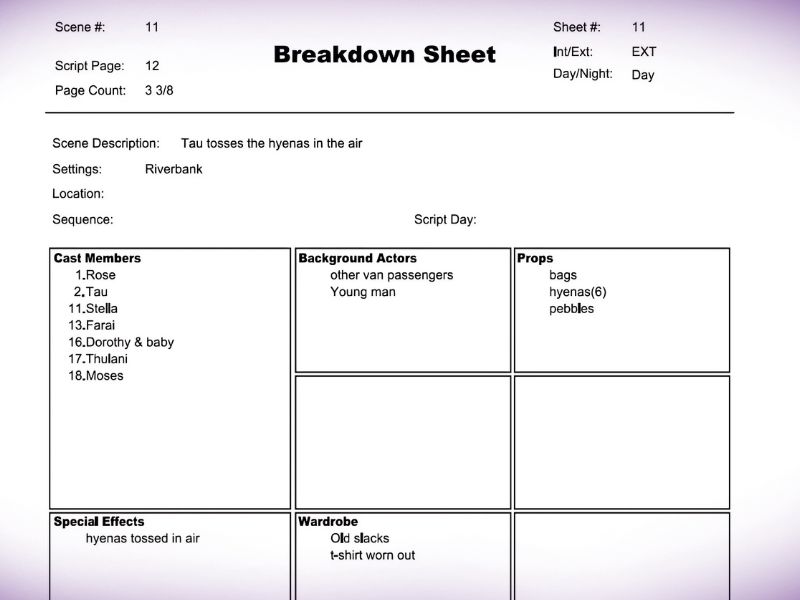
Your breakdown sheet transforms abstract script descriptions into concrete production requirements organized by scene. This information becomes the foundation for your shooting schedule, budget, and daily call sheets.
The Strategic Importance of Script Breakdown
The difference between a production that runs smoothly and one that encounters constant crises often comes down to breakdown quality. Here’s why script breakdowns matter:
Budget Accuracy: By identifying exactly what’s needed for each scene—locations, equipment, talent, special effects—you create realistic budget estimates. Productions that skip thorough breakdowns consistently overrun budgets as unforeseen requirements emerge during principal photography.
Schedule Efficiency: A proper breakdown enables intelligent scene organization. Instead of shooting in script order (wasteful), you organize by location, cast availability, and complexity. This dramatically reduces production days and crew costs.
Risk Mitigation: Early identification of complex scenes, special effects requirements, or scheduling conflicts allows time to problem-solve before production begins. Discovering these issues mid-shoot is exponentially more expensive.
Department Communication: Your breakdown sheet becomes the universal language between producers, directors, and department heads. Everyone knows exactly what’s required and can prepare accordingly.
Crew Preparation: When your gaffer, prop master, and costume designer know their specific requirements weeks in advance, they can source equipment, plan setups, and avoid costly last-minute scrambling.
Understanding Script Breakdown Categories: The 21 Key Elements
Professional script breakdowns organize production elements into standardized categories. Understanding these categories is essential for creating comprehensive breakdowns.
Above-the-Line Elements (Cast-Related)
1. Cast Members
Any actor with a speaking role gets tagged. Cast members are distinguished from extras by their dialogue and character significance. Note that some cast members might not speak but still play important roles (like Maggie Simpson in “The Simpsons”).
2. Extras
Background actors without significant storyline involvement get tagged as extras. Subdivide extras into:
- Atmosphere (people filling space)
- Featured extras (those with minor interactions but no dialogue)
Accurate extra counts directly impact your budget and location permits.
Action and Effects Elements
3. Stunts
Any physical action requiring specialized training or safety equipment gets tagged as a stunt element. Document stunt requirements clearly so your stunt coordinator can properly prepare and staff the shoot.
4. Special Effects (SFX)
Unlike visual effects (VFX) added in post-production, special effects occur on set. These include:
- Weather effects (rain, snow, wind machines)
- Pyrotechnics and explosions
- Blood and squib effects
- Fire effects
- Mechanical setups creating on-set illusions
5. Optical/Visual Effects (VFX)
Visual effects created during post-production or requiring green screen setup. Tag these separately so your VFX supervisor can assess complexity and post-production requirements.
6. Mechanical Effects
On-set mechanical contraptions creating practical effects (animatronics, elevator rockers, etc.).
Physical Elements (Objects and Environments)
7. Props
Any object an actor physically interacts with is a prop. The key distinction: if a character picks up or uses something, it’s a prop. If an object simply sits in the environment, it’s set dressing. This distinction matters for budgeting and department responsibilities.
8. Vehicles (Picture Vehicles)
Cars, motorcycles, trucks, boats, and other picture vehicles that appear on screen. Exclude production vehicles (camera trucks, grip trucks) from this category.
9. Costumes/Wardrobe
Every character’s clothing changes and costume pieces. Create a detailed system tracking:
- Character name
- Outfit number
- Script day worn
- Special requirements (blood, damage, etc.)
10. Makeup
Unusual makeup elements requiring special preparation:
- Prosthetics
- Wounds and scars
- Special aging or character makeup
- Blood and gore makeup
- Animal or creature makeup
11. Set Dressing
Fixed environmental elements that don’t move or get interacted with directly:
- Furniture
- Light fixtures
- Decorations
- Wall treatments
- General room dressing
12. Greenery
While technically set dressing, plant life deserves separate tracking due to different maintenance and care requirements:
- Potted plants
- Trees and shrubs
- Vines and jungle elements
- Landscaping features
Talent and Personnel Elements
13. Livestock (Large Animals)
Large animals requiring their own transportation:
- Horses
- Cows
- Sheep
- Goats
14. Animal Handlers
Small animals (dogs, cats, birds) that trainers bring to set. Animal handlers manage on-set animal performance and safety.
15. Additional Labor
Specialized personnel beyond standard crew:
- Medical advisors
- Military consultants
- Choreographers
- Dialect coaches
- Safety experts
Technical and Creative Elements
16. Music
For scenes featuring characters listening to music or performing music. This differs from your film score (composed in post) or licensed music tracks.
17. Sound
Unusual sound requirements beyond normal production sound recording:
- Playback equipment for live music
- Specialized audio recording
- Sound design elements requiring special setup
18. Special Equipment
Non-standard filmmaking gear needed to achieve the director’s vision:
- Camera cranes
- Dollies and track systems
- Technocrane systems
- Helicopter mounts
- Underwater housings
19. Security
Professional security needed for:
- High-value prop protection
- Celebrity talent safety
- Crowd control at public locations
Additional Categories
20. Miscellaneous
Catch-all category for elements not fitting standard categories. Better to tag something here than miss it entirely.
21. Scene Notes
Space for department-specific reminders, creative notes, or special requirements that don’t fit other categories.
How to Do a Script Breakdown: Step-by-Step Process
Step 1: Prepare Your Script
Before beginning your breakdown, your script must be properly formatted. Formatting errors cause problems when importing scripts into script breakdown software. Verify:
- Correct scene heading format (INT./EXT., LOCATION, DAY/NIGHT)
- Proper character formatting and consistency
- Correct page numbering
- Accurate action line descriptions
- Proper dialogue formatting
Poorly formatted scripts cause breakdown software errors, so invest time in proper formatting before breaking down.
Pro Tip: Many screenplay formats include optional elements that don’t affect the visual story but impact breakdowns. For example, if your script includes specific prop descriptions in action lines, make them clear.
Step 2: Read the Script Three Times
Many filmmakers rush into marking their script immediately. Instead, read it three times with different purposes:
First Read: Read purely as an audience member. Note emotional beats, pacing, and your emotional connection. This helps you understand the director’s vision and priorities.
Second Read: Scan specifically for formatting errors. Fix issues before proceeding with your breakdown.
Third Read: Begin your breakdown marking, now that you understand the script completely.
This three-read approach prevents missing important elements and ensures you understand context before categorizing.
Step 3: Divide Pages Into Eighths
Pages are divided into eight equal 1-inch sections representing roughly 12 seconds of screen time. This standardized measurement helps estimate:
- Scene length and complexity
- Shooting time requirements
- Pacing and rhythm
Why eighths matter: A five-page scene is written as 5/8ths of a page. If a scene spans multiple pages, the “page count” reflects actual screen time, not counting pages. This measurement helps your director and cinematographer estimate realistic shooting time.
For musical performances or dialogue-heavy scenes, this becomes especially important. Lyrics or rapid dialogue might represent more actual screen time than the written page count suggests.
Step 4: Mark Elements with Color-Coding
Industry standard colors help organize elements consistently. Print your script and mark elements with colored highlighting or pencil. Standard colors include:
Pink/Red: Cast members
Yellow: Extras
Green: Props
Blue: Costumes
Orange: Makeup
Purple: Special Effects
Cyan: Vehicles
Brown: Stunts/Action
Using consistent colors across all your scripts ensures you and your team can quickly scan marked scripts and understand what’s needed.
Pro Tip: Many filmmakers now use digital marking in screenwriting software (Final Draft with tagging, or other tools) rather than physical highlighting. Digital marking allows notes and comments without physical ink.
Step 5: Create a Script Breakdown Sheet for Each Scene
A script breakdown sheet is the document that transforms your colored markings into organized, usable information. Your sheet should include:
| Element | Category | Count | Notes |
|---|---|---|---|
| Scene Number | Reference | 1 | “Scene 5” |
| Location | Setting | 1 | “Murphy’s Apartment” |
| Int/Ext | Time | 1 | “INT” |
| Day/Night | Time | 1 | “DAY” |
| Page Count | Duration | 5/8 | In eighths |
| Cast Members | Personnel | 2 | “Sarah, Detective Hayes” |
| Extras | Personnel | 10-15 | “Restaurant patrons” |
| Props | Objects | 5 | “Coffee cup, newspaper, gun, phone” |
| Costumes | Wardrobe | 3 | “Casual clothes, detective outfit” |
| Special Effects | Effects | 1 | “Slight smoke effect” |
| Vehicles | Transportation | 1 | “Police car” |
| Special Equipment | Tech | 2 | “Hidden camera rig, wireless mic” |
| Notes | Reference | 1 | “Night shoot, requires special permits” |
Your breakdown sheet becomes the reference document showing exactly what’s needed to film that scene.
Step 6: Compile Your Full Script Breakdown Report
Once individual scenes are broken down, compile them into a comprehensive script breakdown report. This document shows:
- All scenes requiring specific cast members
- All locations and their associated scenes
- Equipment needs across the production
- Special effects or stunts requiring advance preparation
- Budget implications by scene
This report becomes your bible for scheduling, budgeting, and crew preparation.

Script Breakdown Sheet Template: What to Include
A proper script breakdown sheet template should include these elements:
Top Section (Scene Information):
- Scene number
- Scene heading
- Page count (in eighths)
- Int/Ext designation
- Day/Night indicator
- Location description
Middle Section (Element Tracking):
- Cast members with notes
- Extras (count and type)
- Props list
- Costume changes
- Makeup requirements
- Special effects/stunts
- Vehicles
- Special equipment needs
- Animal requirements
Bottom Section (Production Notes):
- Special department requirements
- Estimated shooting time
- Location-specific information
- Technical requirements
- Department head sign-offs
Your template should be printable and shareable. Many teams print breakdown sheets for each department head to review and validate before production begins.
Script Breakdown Software: Digital Solutions for Modern Filmmakers
While manual breakdowns work for small productions, script breakdown software dramatically streamlines the process, especially for complex projects.
Movie Magic Scheduling: The Industry Standard
Movie Magic Scheduling remains the professional gold standard for script breakdowns and scheduling. Used by studios, production companies, and experienced independent filmmakers for decades.
Key Features:
- Automatic element recognition from formatted scripts
- Customizable breakdown categories
- Integrated scheduling capabilities
- Powerful reporting functions (DOOD reports, production calendars)
- Real-time collaboration (newer cloud versions)
- Industry-standard format accepted by studios and completion bonds
Strengths:
- Most robust breakdown capabilities
- Extensive production element library
- Seamless integration with budgeting software
- Professional acceptance across the industry
- Customizable for any production type
Limitations:
- Higher learning curve than newer software
- Desktop-based (though cloud versions now available)
- Significant investment ($489 one-time or $50/month)
Best For: Large productions, studio requirements, projects requiring professional-level reporting
Pricing: $489 (perpetual license) or $50/month (subscription)
Final Draft with Tagging
If you already use Final Draft for screenwriting, its built-in tagging feature provides basic script breakdown capabilities.
Key Features:
- Integrated into your writing software
- Tag elements as you write or during revision
- Generate breakdown reports
- Export to Movie Magic Scheduling
- Built-in story mapping features
Strengths:
- No additional software purchase if you already use Final Draft
- Seamless script-to-breakdown workflow
- Professional-level element tracking
- Easy export to industry-standard formats
Limitations:
- Less powerful than dedicated breakdown software
- Primarily a screenwriting tool with breakdown features
- Limited scheduling integration
Best For: Screenwriters using Final Draft, simple to moderate complexity productions
Pricing: Included with Final Draft subscription
Gorilla Scheduling: Affordable Professional Option
Gorilla Scheduling offers professional breakdown capabilities at lower cost than Movie Magic.
Key Features:
- Direct script import
- Automatic character and prop recognition
- Detailed breakdown sheet generation
- Integrated scheduling
- Production calendar generation
- Personal consultation service available
Strengths:
- More affordable than Movie Magic
- Professional-quality breakdowns
- Good customer support
- Integrated scheduling features
- Optional expert consultation
Limitations:
- Smaller user community than Movie Magic
- Less established in studio environments
- Desktop-only (limited cloud features)
Best For: Independent filmmakers, low-to-mid-budget productions, budget-conscious producers
Pricing: $69 one-time or $20/month subscription
Celtx: Integrated Pre-Production Suite
Celtx combines screenwriting, scheduling, budgeting, and breakdown tools in one platform.
Key Features:
- Integrated script writing
- Breakdown functionality
- Scheduling and calendar management
- Budgeting tools
- Collaborative features
- Cloud-based platform
Strengths:
- All-in-one pre-production tool
- Affordable for comprehensive features
- Cloud-based collaboration
- Good for smaller productions
- Beginner-friendly
Limitations:
- Breakdown features less comprehensive than dedicated tools
- Not ideal for very complex productions
- Smaller professional adoption
Best For: Indie filmmakers, students, small production teams, projects using multiple Celtx tools
Pricing: Writer ($14.99/month), Writer Pro ($24.99/month), Team ($59.95/month)
How to Breakdown a Script for Specific Production Types
Feature Films
Feature film breakdowns must be comprehensive and detailed. With budgets often exceeding $1 million and shooting schedules of 6-12 weeks, accuracy is critical. Feature breakdowns typically:
- Account for multiple locations
- Track complex cast availability
- Identify cumulative special effects and stunts
- Plan for pick-up days and contingencies
- Support detailed department planning
Short Films
Short film breakdowns should be thorough but can be simplified if your script is straightforward. Short film considerations:
- May use fewer locations
- Often smaller cast
- Less complex equipment needs
- Faster turnaround from breakdown to shoot
- May combine roles (actors playing multiple characters)
Commercials
Commercial breakdowns focus heavily on:
- Product placement and visibility requirements
- Specific location requirements matching client brief
- Quick turnarounds (commercials shoot in 1-3 days)
- Talent continuity across multiple spots
- Special effects or product demonstrations
Documentaries
Documentary breakdowns differ significantly:
- Less predictable element identification (gathering footage spontaneously)
- Interview subject tracking
- Location recces for real-world locations
- Archival material sourcing
- B-roll planning by theme
Television Episodes
TV episode breakdowns must account for:
- Series regular cast availability
- Recurring location familiarity
- Episode-specific guest stars
- Multi-episode production schedules
- Consistent visual style requirements
Common Script Breakdown Mistakes and How to Avoid Them
Mistake 1: Incomplete or Rushed Breakdowns
Rushing your breakdown to start pre-production creates problems throughout production. Every incomplete category causes on-set surprises and costly revisions.
Solution: Allocate proper time for breakdowns—typically 1-2 weeks for feature scripts. Have another producer or department head review your breakdown before finalizing.
Mistake 2: Inconsistent Categorization
Treating similar elements differently across scenes creates confusion. If you tag a “coffee cup” as a prop in scene 5 but ignore identical cups in scenes 8 and 12, your prop master can’t properly prepare.
Solution: Use consistent categories and definitions throughout. Document your categorization system for team reference.
Mistake 3: Ignoring Department-Specific Needs
A prop master might see requirements differently than a producer. Missing specialized department needs causes gaps in preparation.
Solution: Have each department head review their relevant breakdown sections. The prop master validates prop lists, the costume designer reviews wardrobe changes, etc.
Mistake 4: Not Accounting for Multi-Scene Requirements
An actor’s costume change across scenes, or a prop used in multiple locations, requires cumulative tracking. Breakdowns should show which scenes use which costumes to avoid wardrobe continuity issues.
Solution: Create cumulative reports showing actor costumes across all scenes, props used in multiple locations, etc.
Mistake 5: Forgetting Special Requirements
Easy-to-overlook elements include background cars, street signs, weather conditions, or specific decor. Missing these late in pre-production requires rushed problem-solving.
Solution: Use a checklist including commonly overlooked elements: vehicles in background, weather effects, signage, security requirements, permit implications.
Mistake 6: Not Validating Against Script Formatting
Poorly formatted scripts cause breakdown software errors. If scene headings are inconsistent, the software may miss location groupings.
Solution: Before importing any script into software, review formatting thoroughly. Correct errors in your screenwriting software.
Advanced Script Breakdown Strategies
Creating Cumulative Element Reports
Beyond scene-by-scene breakdowns, create reports showing elements across the entire production:
Costume Continuity Report: Shows which outfits appear in which scenes, preventing wardrobe continuity errors.
Location Report: Lists all locations and their associated scenes, helping the location manager prioritize location scouting.
Cast Availability Report (DOOD): Shows which actors work which days, identifying potential scheduling conflicts early.
Equipment Requirements Report: Consolidates all special equipment needed, helping your grip and electric departments prepare.
Identifying Cumulative Challenges
Some production challenges only appear when analyzing your full breakdown:
- Does one location require five different setups with different lighting? This impacts your daily page count.
- Do multiple stunts occur across different scenes? Your stunt coordinator needs comprehensive advance notice.
- Are complex special effects spread across numerous scenes? This affects your VFX budget and timeline.
Optimizing Shooting Order
Your breakdown directly informs shooting order optimization:
- Group scenes by location to minimize company moves
- Organize by special effects complexity
- Account for actor availability windows
- Consider weather and seasonal requirements
- Build in contingency days
The best shooting orders often differ dramatically from script order, and good breakdowns make these optimizations obvious.
Free Script Breakdown Resources
Not everyone needs premium software. Free resources include:
Free Templates
Google Docs Template: Search “free script breakdown template Google Docs” for basic templates you can customize.
Excel Spreadsheet: Create custom templates in Excel matching your production needs.
Advantages and Limitations of Free Tools
Advantages:
- No financial investment
- Flexibility to customize
- Sufficient for small productions
- Easy learning curve
Limitations:
- Manual data entry is time-consuming
- No automation or error checking
- Difficult to share and collaborate
- Limited reporting capabilities
- Prone to human error
When Free Tools Work:
- Short films under 10 pages
- Simple single-location scripts
- Low-budget productions without investor requirements
- Projects without complex special effects or stunts
When Paid Software Makes Sense:
- Feature films over 100 pages
- Productions with multiple locations
- Complex productions with stunts, effects, special equipment
- Productions requiring professional reporting
- Investor or studio requirements for professional documentation
Script Breakdown Best Practices
Preparation Phase
- Read thoroughly before beginning breakdown
- Verify script formatting before importing to software
- Establish breakdown categories your production will use
- Create a reference guide documenting your categories and colors
Breakdown Phase
- Work methodically scene by scene—don’t skip ahead
- Validate context before tagging—does this prop really need tracking?
- Use consistent language so department heads understand your categories
- Document unusual elements in notes section
Review and Distribution Phase
- Have department heads review their relevant sections
- Correct errors early—it’s easy now, painful later
- Create cumulative reports showing elements across the entire production
- Distribute clearly so everyone has access to updated versions
- Document version numbers to avoid working with outdated breakdowns
The Evolution of Script Breakdown
Historically, script breakdowns were entirely manual—producers printed scripts, marked them with colored pens, and manually entered data into templates. This tedious, error-prone process could take weeks.
Modern script breakdown software has revolutionized the process. AI-powered tools now analyze scripts automatically, recognizing elements that previously required human analysis. Cloud-based platforms enable real-time collaboration, allowing multiple department heads to review and contribute simultaneously.
Looking forward, script breakdown software will likely include:
- More advanced AI element recognition
- Real-time production updates syncing breakdown to scheduling and budgeting
- Machine learning adapting to production-specific conventions
- Enhanced mobile access for on-set reference
- Predictive analytics identifying potential production challenges
Conclusion: From Script to Set
A thorough script breakdown is the bridge between your creative vision and practical production execution. Whether you’re working with free templates, professional software like Movie Magic Scheduling, or modern alternatives like StudioBinder or Filmustage, the fundamentals remain constant: systematic analysis, clear categorization, and comprehensive documentation.
Your breakdown sheet communicates essential information to every department head, enabling them to prepare properly and anticipate challenges. The time invested in thorough breakdown saves exponentially more time during production—preventing on-set surprises, maintaining schedule efficiency, and keeping costs under control.
For filmmakers managing their first production breakdown or experienced producers seeking streamlined processes, professional guidance can prevent costly mistakes and ensure your breakdown supports rather than hinders production. Professional line producers and production managers bring years of experience identifying overlooked elements, optimizing shooting orders, and building realistic schedules from comprehensive breakdowns.
At First Draft Filmworks (https://firstdraftfilmworks.com/), our production team brings comprehensive expertise in script analysis and breakdown development. With over 8 years of production experience across diverse project types, we’ve managed breakdowns for productions of all scales—from intimate indie dramas to multi-location feature films with complex effects requirements.
Our Script Breakdown service provides thorough analysis, professional documentation, and strategic recommendations for optimizing your production. Whether you need a complete breakdown from scratch, validation of an existing breakdown, or consultation on breakdown-to-scheduling optimization, our team delivers professional-grade analysis that sets your production up for success.
Ready to master your script breakdown? Visit https://firstdraftfilmworks.com/ to explore our Script Breakdown services and schedule a consultation with one of our experienced production professionals today.

FAQ: Common Script Breakdown Questions
Q: How long does a script breakdown take?
A: For a typical feature script (90-120 pages), expect 20-40 hours for manual breakdown, or 4-8 hours using professional software. Complexity varies significantly based on scene variety and special requirements.
Q: Can I break down my own script or do I need a professional?
A: You can absolutely break down your own script. For small productions, this is common. For larger productions requiring investor-ready documentation, professional breakdown ensures nothing is missed.
Q: What happens if I skip or rush the breakdown?
A: Rushed breakdowns create production day surprises. Missing elements become costly on-set problems—unavailable locations, unprepared crews, inadequate equipment. Thorough breakdowns prevent these expensive crises.
Q: Should I break down my script before or after writing?
A: Break down your completed script. Breakdowns require final script versions since elements change during revision. Breaking down early scripts wastes time as elements change constantly.
Q: How detailed should my breakdown be?
A: More detail is better than less. Better to overthink than miss something. You can always combine similar elements later, but adding forgotten elements mid-production is expensive.
Q: Can script breakdown software automate the entire process?
A: Software accelerates breakdown significantly, but human review is essential. AI-powered tools might miss context-specific elements or misinterpret unusual requirements. Always review software-generated breakdowns thoroughly.
Q: How do I know if I’ve missed elements in my breakdown?
A: Have department heads review breakdown sections relevant to their department. A prop master will catch missed props better than anyone. Experienced producers often spot elements you might overlook.
Q: Should I include every tiny detail in my breakdown?
A: Include everything an actor uses, location requires, or crew needs to prepare. If you’re uncertain, include it—better to have unnecessary information than missing critical elements.
Q: How do breakdowns connect to the shooting schedule?
A: Your breakdown provides the raw data that informs your shooting schedule. Location groupings, cast availability, and scene complexity all emerge from your breakdown to create an efficient shooting order.

